# 1.1 Initial Settings

### **(i) Display Language Settings**

\
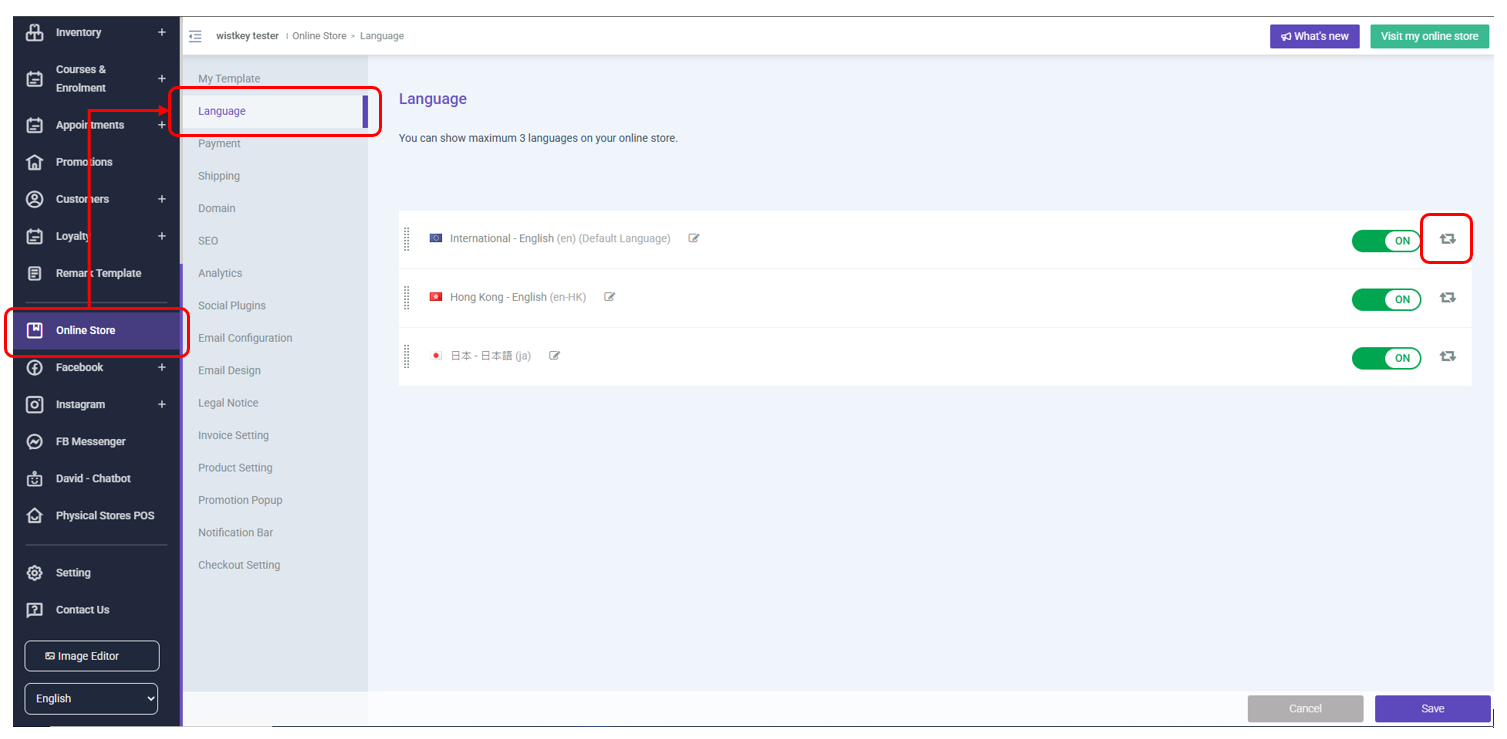
In order to assist brands to expand their business into new markets, STOREBERRY now supports 5 display language options for merchants to further serve the needs of individual customers.

Display languages can be set for your online store in                                                                        <mark style="color:purple;background-color:purple;">STOREBERRY Admin Panel</mark> <mark style="color:purple;">→</mark> <mark style="color:purple;background-color:purple;">「Online Store」</mark> <mark style="color:purple;">→</mark> <mark style="color:purple;background-color:purple;">「Language」</mark> . More new display languages are coming up!

<figure><img src="/files/NzEdYtyMXSmyjOw10H7E" alt=""><figcaption></figcaption></figure>

### **(ii) Admin Account and Permission Settings**

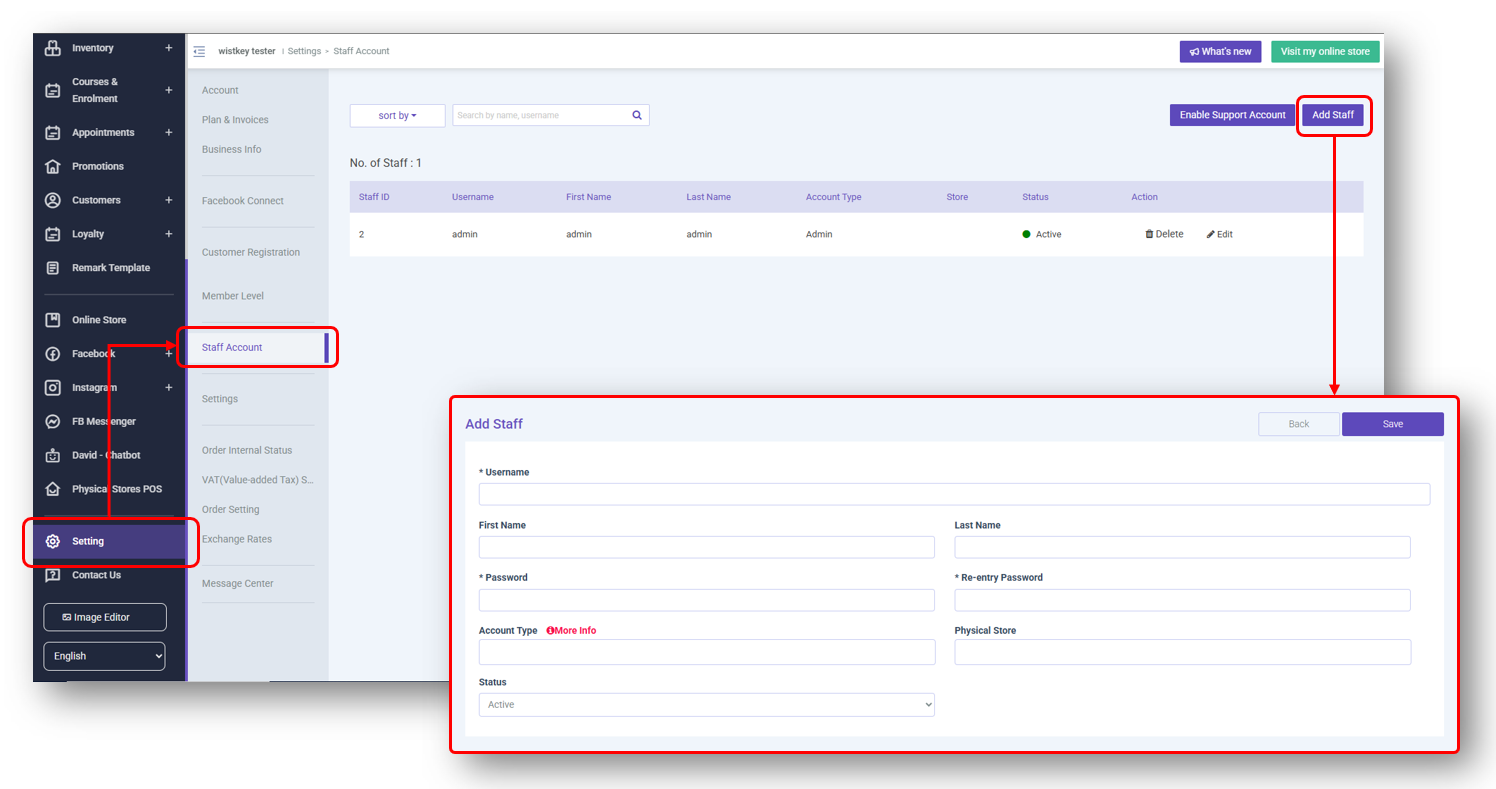
STOREBERRY attaches great importance to the security of your online store, and especially provides unlimited administrator accounts (except for the entry plan) for STOREBERRY users. You can feel free to set the access level to the admin panel for all your employees.

You can go to the  <mark style="color:purple;background-color:purple;">STOREBERRY Admin Panel</mark> <mark style="color:purple;">→</mark> <mark style="color:purple;background-color:purple;">「Setting」</mark> <mark style="color:purple;">→</mark> <mark style="color:purple;background-color:purple;">「Staff Account」</mark> to view and manage all admin rights, or click 「Add Staff」 at the top right to add the new admin account for your employees.

<figure><img src="/files/vzshV1pNtyaBMLwP1Hvw" alt=""><figcaption></figcaption></figure>

It takes you too much time to set management permissions one by one? STOREBERRY has preset up to 10 administrator permissions for you to complete the permissions setting with just one click! The default administrator permissions include:

<table data-full-width="false"><thead><tr><th width="48"></th><th width="185">Administrator category</th><th width="374">Backend management system permissions</th><th>Mobile application function permissions</th></tr></thead><tbody><tr><td>1</td><td>Shop Owner</td><td>All permissions</td><td>All permissions</td></tr><tr><td>2</td><td>Admin</td><td>• Product Classification Management<br>• Product management<br>• Inventory management<br>• Customer relationship management<br>• Order management<br>• Online POS sales system</td><td>All functions</td></tr><tr><td>3</td><td>Store Manager</td><td>• Product Classification Management<br>• Product management<br>• Inventory management<br>• Customer relationship management<br>• Order management<br>• Online POS sales system</td><td>All functions</td></tr><tr><td>4</td><td>Product Manager</td><td>• Product Classification Management<br>• Product management<br>• Inventory management</td><td>/</td></tr><tr><td>5</td><td>Report Viewer</td><td>• View report</td><td>/</td></tr><tr><td>6</td><td>Cashier</td><td>• Online POS sales system</td><td>Can only log in to allowed shops, and cannot view reports</td></tr><tr><td>7</td><td>Salesperson</td><td>• Online POS sales system</td><td>/</td></tr><tr><td>8</td><td>Cost Manager</td><td>• Product cost price</td><td>/</td></tr><tr><td>9</td><td>Inventory Manager</td><td>• Inventory management</td><td>/</td></tr><tr><td>10</td><td>Inventory Viewer</td><td>• Inventory management (View only）</td><td>/</td></tr></tbody></table>


---

# Agent Instructions: Querying This Documentation

If you need additional information that is not directly available in this page, you can query the documentation dynamically by asking a question.

Perform an HTTP GET request on the current page URL with the `ask` query parameter:

```
GET https://storeberry-docs.gitbook.io/user-guide/en/common-settings/1.1-initial-settings.md?ask=<question>
```

The question should be specific, self-contained, and written in natural language.
The response will contain a direct answer to the question and relevant excerpts and sources from the documentation.

Use this mechanism when the answer is not explicitly present in the current page, you need clarification or additional context, or you want to retrieve related documentation sections.
